Project Overview
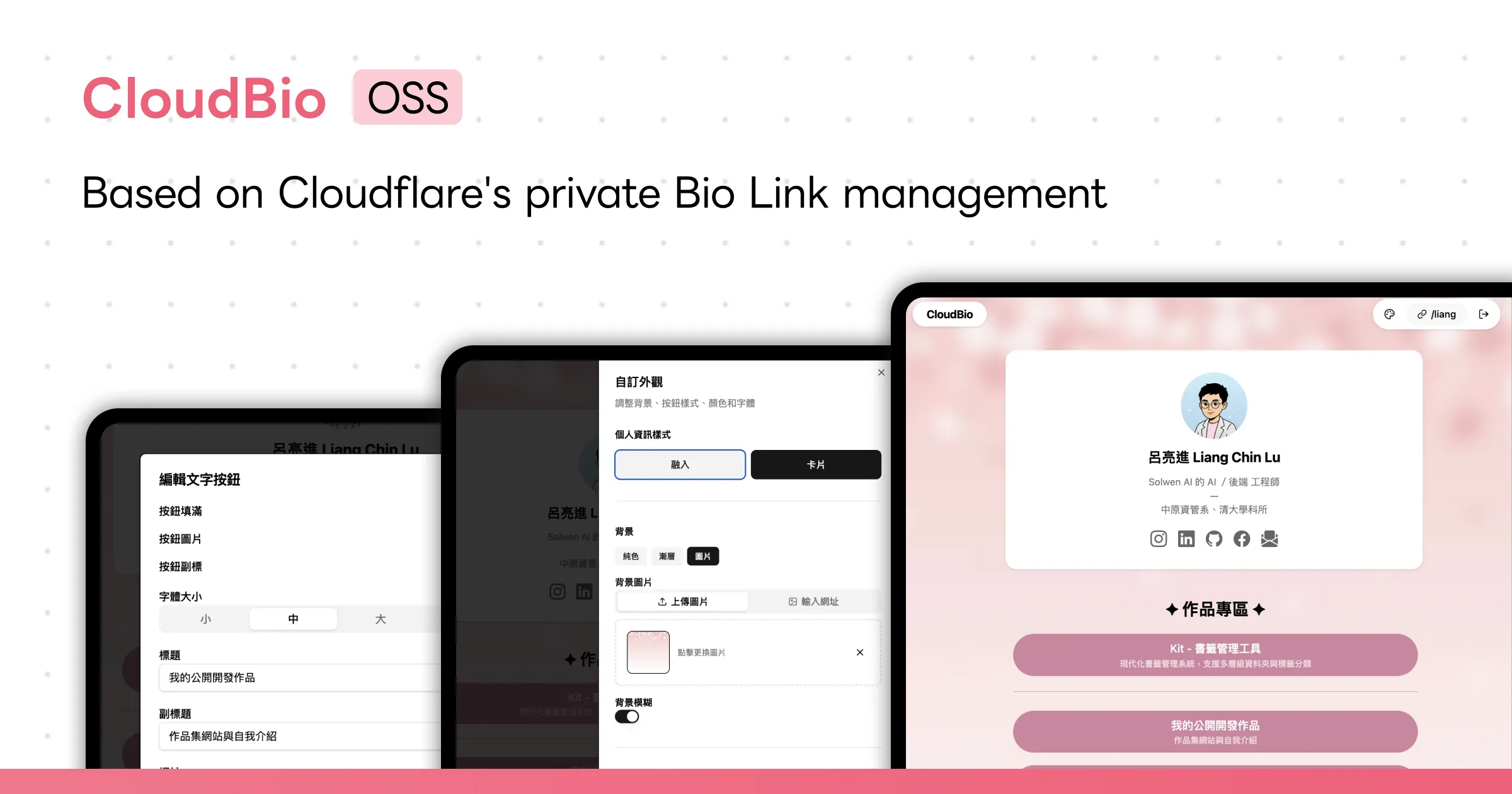
CloudBio is a self-hosted Bio Link management tool, an open-source alternative similar to Linktree / Portaly. Users can freely combine text buttons, carousel banners, video players, and other block types through a visual drag-and-drop editor to create personalized Bio Link pages.
The full-stack architecture is built on Hono running on Cloudflare Workers, paired with D1 SQLite database, R2 object storage, and KV cache, delivering a complete Bio Link service with zero server maintenance cost.
Core Features
Seven Block Types
Supports text buttons (with subtitles, images, and animation effects), carousel banners, square panels, two-column grids, video players (YouTube), dividers, and rich text blocks — covering a wide range of content display needs.Drag-and-Drop Editor
Implements Notion-style block drag-and-drop sorting using@dnd-kit, paired with a mobile simulation preview frame for real-time editing feedback.Appearance Customization System
Supports solid color, gradient, and image background modes, with customizable button styles, fonts, and text colors, and two profile layout options: integrated and card-style. Advanced users can apply custom CSS for further adjustments.Multi-Page Management
Supports creating multiple sub-pages under a single account, each with its own independent block configuration. Button blocks can link directly to other sub-pages, allowing users to organize more complex content structures in a tabbed manner while keeping the experience simple and intuitive.Social Platform Integration
Built-in icons for 13 social platforms (Instagram, GitHub, LinkedIn, X, Threads, etc.) for one-click social link setup.Image Management
Handles image uploads viaCloudflare R2, with client-side WebP compression and cropping tools to reduce bandwidth consumption and storage costs.Drag-and-Drop Sorting Experience

Drag-and-drop sorting implemented with @dnd-kit: a quick click (within 300ms) opens the editor, while a long press enters drag mode. Mouse movement beyond 8px triggers dragging, preventing accidental interactions. Intuitive on both mobile and desktop without needing extra drag handles or mode switches.
Live Preview

The editor features a built-in mobile simulation preview frame where all changes are reflected in real time. What you see in the dashboard matches exactly what visitors see on the public page — no back-and-forth switching required.
Image Compression
Images are WebP-compressed and cropped on the client side before upload, reducing transfer size and R2 storage usage. After upload, long-term cache headers are applied for access, minimizing bandwidth from repeated requests.
Technical Architecture
Frontend
Built withReact 19 alongside the shadcn/ui component library and Tailwind CSS v4 for a modern interface. Uses SWR for data synchronization, @dnd-kit for drag-and-drop interactions, and react-easy-crop for image cropping.Backend
UsesHono as the web framework, running on Cloudflare Workers edge computing. Cloudflare D1 (SQLite) serves as the database, R2 stores image assets, and KV caches rendered page HTML. Drizzle ORM is used for type-safe data operations.Authentication
Custom-built JWT authentication with passwords hashed usingPBKDF2-SHA256 (100,000 iterations). Sessions are managed with HttpOnly + Secure + SameSite cookies, with email whitelist-based invitation registration.SSR Rendering
Public Bio pages use server-side rendering with results cached toKV, avoiding repeated database queries and improving load speed for visitors.Tool Selection
The entire project is built on the Cloudflare ecosystem, and tool choices were made with that foundation in mind.
Why Hono instead of Express
Express is designed for Node.js environments and requires an additional compatibility layer to run on Cloudflare Workers, which compromises both performance and compatibility.Hono was built from the ground up for edge computing environments, natively supporting the Workers Request / Response API without any conversion overhead. Its routing system and middleware design are intuitive — the developer experience is similar to Express, but without any compatibility concerns.Why D1 instead of other databases
For the same reason as choosing Hono — since the entire architecture runs on Cloudflare,D1 is the most natural database pairing. D1 is Cloudflare’s native SQLite service with zero-latency connections to Workers, eliminating the need to manage connection pools or cold start issues typical of external databases. Combined with Drizzle ORM for type-safe data operations and migration management, the development workflow is smooth and efficient.R2 + KV Division of Responsibility
R2 handles persistent storage of static assets like images, while KV caches rendered page HTML. Each serves a distinct role: R2 handles large files, KV handles small data with high read frequency. Both are native Cloudflare services requiring no additional setup or maintenance.Database Design
Uses Cloudflare D1 (SQLite) with Drizzle ORM, covering users, pages, block content, and appearance settings across four tables. Blocks use a JSON config field to store type-specific configuration data, enabling a flexible polymorphic block architecture.
| Table | Description | Key Fields |
|---|---|---|
users | User accounts and personal information | id, email, username, password_hash, display_name, bio, avatar_url, social_links |
pages | Multi-page management supporting home and sub-pages | id, user_id, slug, title, sort_order, is_default |
blocks | Bio page content blocks (seven types) | id, user_id, type, config (JSON), is_active, sort_order |
appearances | User appearance and theme settings | id, user_id, background, button_style, font_family, text_color, custom_css |
Database Design Details
JSON Config Polymorphic Design
Different block types require very different attributes: buttons need links, subtitles, and animation effects; carousel banners need multiple images and label settings; videos only need a YouTube URL. Creating a separate table or adding numerous nullable columns for each type would make the database difficult to maintain. Instead, the blocks table only retains common fields (type, is_active, sort_order), with all type-specific configuration stored in a singleconfig JSON field. Adding a new block type only requires defining a new Config interface and default values — no database schema changes needed.Fractional Sort Order
Drag-and-drop sorting uses a floating-pointsortOrder rather than integer indices. When moving a block from position A to between B and C, the new sortOrder is (B + C) / 2. This means each reordering only requires updating a single record, without renumbering the entire list. Even after many sorting operations, floating-point precision is more than sufficient for real-world usage.Multi-Page Support
The pages table uses theslug field to distinguish the home page (empty string) from sub-pages, with a unique index on (userId, slug) to ensure no duplicate page paths exist for the same user. Blocks are associated with their page via pageId, and deleting a page cascades to delete all blocks beneath it.Caching Strategy
Public Bio pages are SSR-rendered and cached to Cloudflare KV, avoiding repeated database queries on every visit.
Cache Policy
Page HTML TTL is set to 5 minutes. Visits within the cache window require no database access at all. Key formats arepage:{username} and page:{username}:{slug} for home pages and sub-pages respectively.Index Tracking and Precise Invalidation
To correctly invalidate the cache when a user updates content, the system maintains apages-idx:{username} index that records all cached sub-page slugs for that user. This allows all keys to be found and cleared at once via the index when a full invalidation is needed, without guessing or scanning. Modifying a single block only invalidates the cache for that block’s associated page, avoiding unnecessary full invalidations.API Design
RESTful API designed with Hono routing, with all authenticated endpoints protected by JWT Middleware:
Authentication /api/auth
Profile /api/profile
Block Management /api/blocks
Appearance Settings /api/appearance
Image Upload /api/upload
/api/img/* with long-term cache headersPublic Page /api/bio/:username