Project Overview
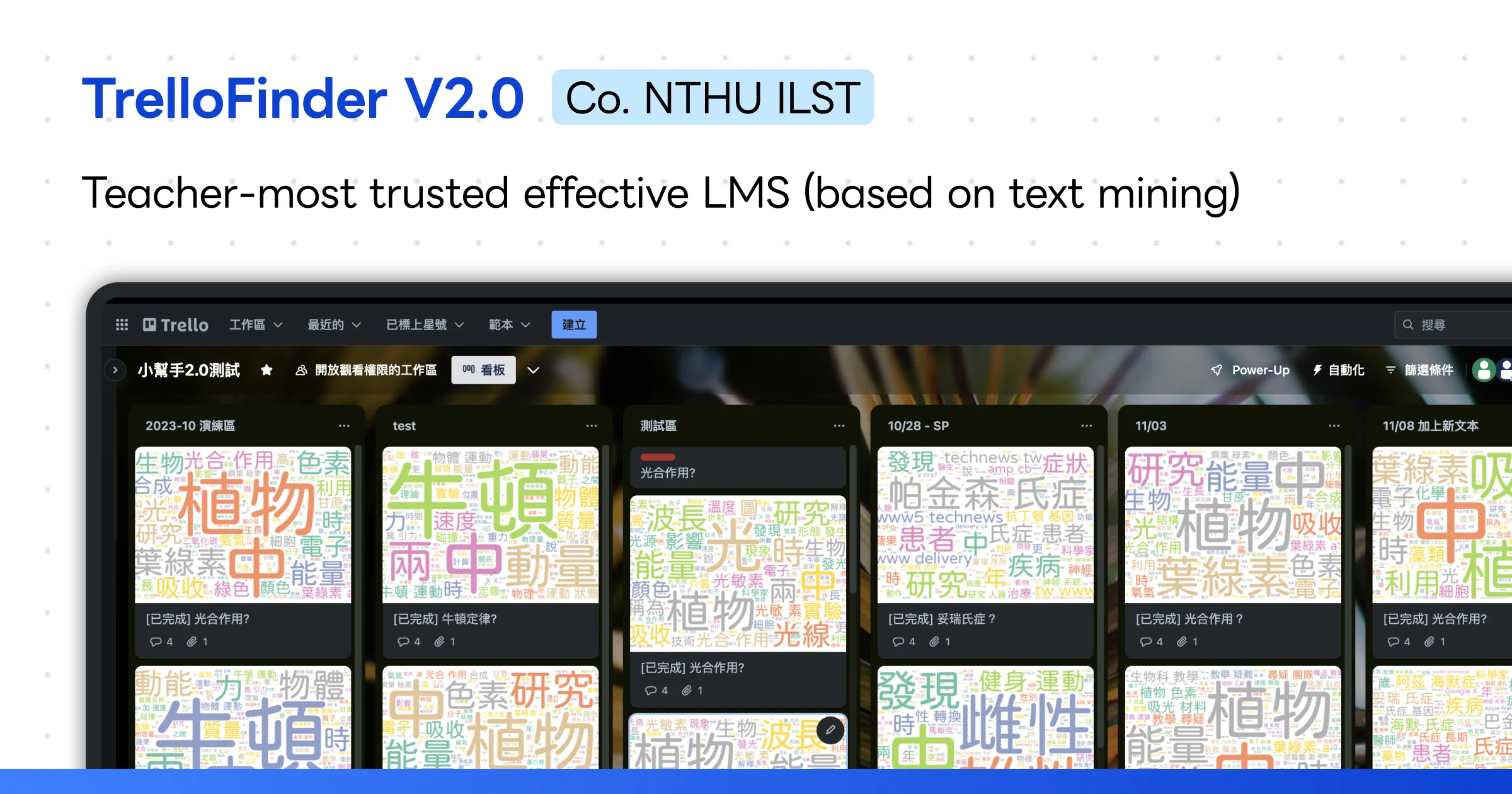
When high school students start a self-regulated science project, they read around a topic before settling on a specific learning goal. One student in our paper asked “What is chlorophyll?” on Trello. The assistant recommends articles, and students can ask follow-up questions in the same card after reading. The original question, article links, and later replies stay together, forming a personal Q&A knowledge base.
I built the system with a research team at National Tsing Hua University for a science education project associated with Taiwan’s Ministry of Education. We chose Trello because teachers already use boards to follow students’ progress in inquiry-based projects. Teachers can see the status of every card on one board and open a card to see what a student asked and where the discussion has led.
My Role
I was an R&D engineer on the research team, focusing on search and AI chat. I combined term-frequency search, keyword expansion, and article embeddings to recommend reading material. I also built the chat flow that picks up the discussion from the comments on each card, and integrated the Flask API, Trello webhooks, background jobs, and the Milvus vector index.
Awards
TWELF 2024 19th Taiwan E-Learning and Educational Technology Conference
Best Paper Award 。 AIES Division
Features
Find a direction to explore in teacher-reviewed articles
Start a search with a card title such as “# What is chlorophyll?” The assistant looks for reading material in a collection of science articles reviewed by teachers. In the example from our paper, the results include introductions to chlorophyll and related experiments, as well as suggestions about concepts such as phytochromes. Students can pick one of those leads to explore further.
Teachers and students can see whether a request is waiting or in progress in the card title. When the search finishes, the assistant posts the article titles and links back to the card in groups. It also uses text from the candidate articles to generate a word cloud for the card cover.
Discuss what you read with AI on the same card
After reading that some forms of chlorophyll can absorb infrared light, a student can ask the AI assistant in a card comment how that works. The assistant retrieves articles based on the card’s topic and the new question, uses the earlier discussion to answer, and poses a follow-up question. Students can open the cited articles and bring another question back to the AI. The reading material and conversation remain on the same card.
Key Decisions
Respond to the webhook before workers run searches and generate replies
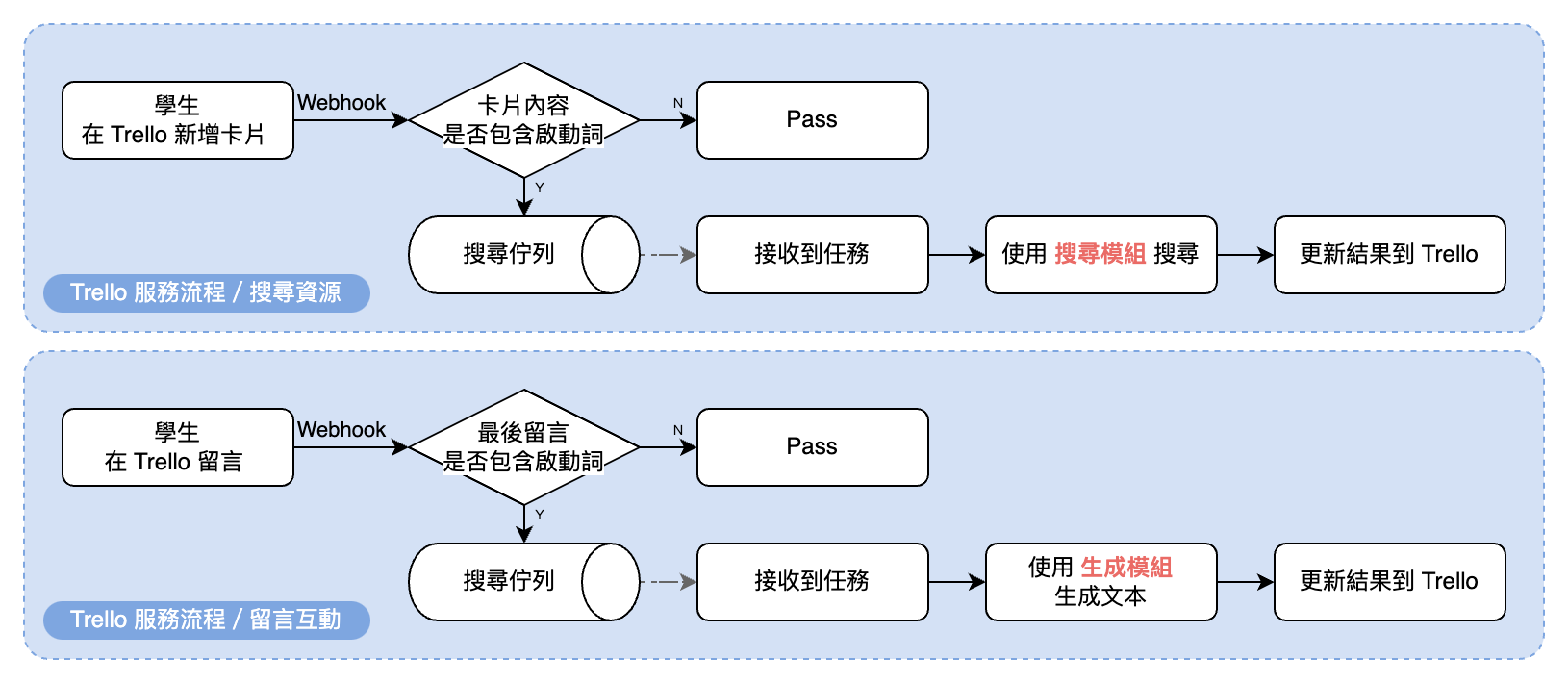
A recommendation requires extracting keywords and querying an article index. A follow-up also requires reading the comments, finding reference material, and waiting for the AI to generate a reply. If the webhook waits for these steps, a class full of students asking questions at once can tie up multiple requests long enough for them to time out.
I put search and comment replies on separate task queues. When a Trello event arrives, the webhook sends the task to the appropriate queue, marks the card as waiting, and responds to Trello. A background worker picks up the task and posts the recommendations or reply to the original card.
When several students ask questions at once, the queues absorb the burst and available workers take tasks as they free up. The worker count can be tuned to the machine’s capacity so tasks run in parallel within a manageable limit.
Trade-off
The webhook can respond sooner. Students still wait for their tasks to reach a worker and finish. Too few workers can mean longer queues at peak times. Adding workers also puts more load on the machine and external AI services. The board’s waiting and in-progress statuses help students and teachers see where a task stands.
Use three search methods to surface related concepts
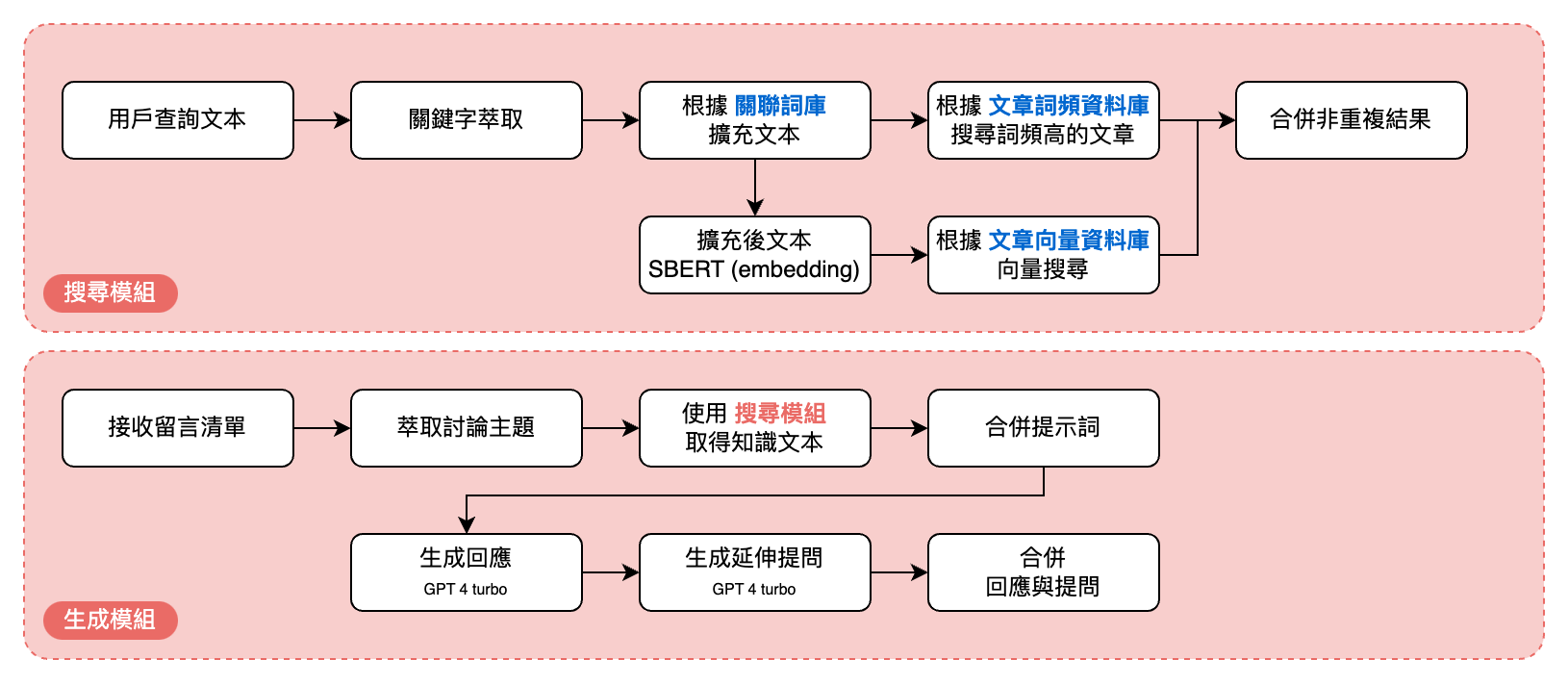
Students setting a learning goal need material that answers their first question and introduces concepts they might want to investigate next. I used three search passes over the same teacher-reviewed collection to find both kinds of material.
- Term-frequency search. Look up the terms from the original question. When an article matches several terms, add their scores to rank the article in the direct matches.
- Keyword expansion. Encode the expanded query with Sentence-BERT and use Milvus to find similar keywords. Look up those terms in the article index to find relevant articles that use different vocabulary.
- Article-vector search. Combine the original and expanded query vectors with weights, then compare the result with article embeddings in Milvus to find articles with similar meaning overall.
Each pass gives the next one a list of article IDs to skip. Results are posted in separate groups on the Trello card, so students can tell which articles matched their original terms and which were found through expansion.
Our paper compared results for a student who used the misspelled Chinese term 矽晶元 when asking what a silicon wafer was. Term-frequency search returned no results. The hybrid search still found material on silicon wafers (矽晶圓). Article-vector search surfaced a wider range of material on silicon’s properties and uses, ranking more direct wafer references farther down.
Trade-off
Keeping the three groups lets students see how results were found. An article stays in the first group that found it. Expanding keywords can surface more articles, including some only loosely related to the question, so the related-term dictionary, matching thresholds, and vector indexes need maintenance.
Data and Reply Workflows
Prepare the articles and build reusable indexes
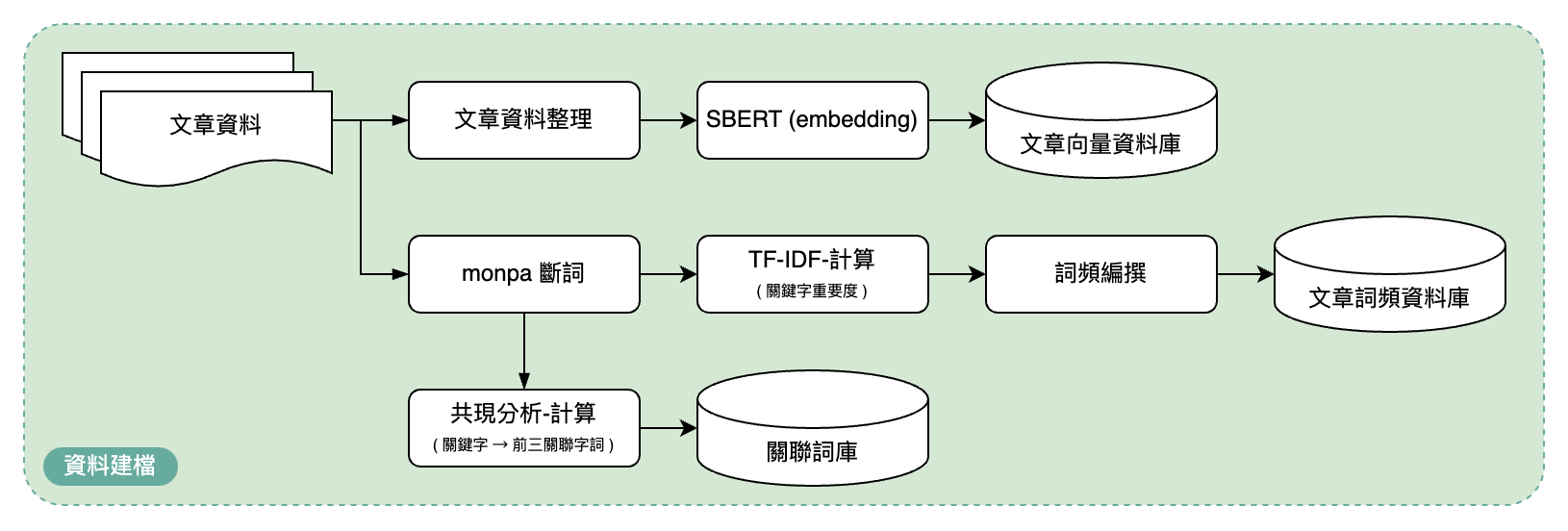
The study used about 40,000 teacher-reviewed science articles. MongoDB stores their titles, text, and links so search results can point back to the originals. During indexing, Monpa segments the text, and TF-IDF and co-occurrence analysis help build term-frequency indexes and a related-term dictionary. A multilingual Sentence-BERT model encodes the combined title and body, and Milvus stores the embeddings for search.
Recover the discussion from the card
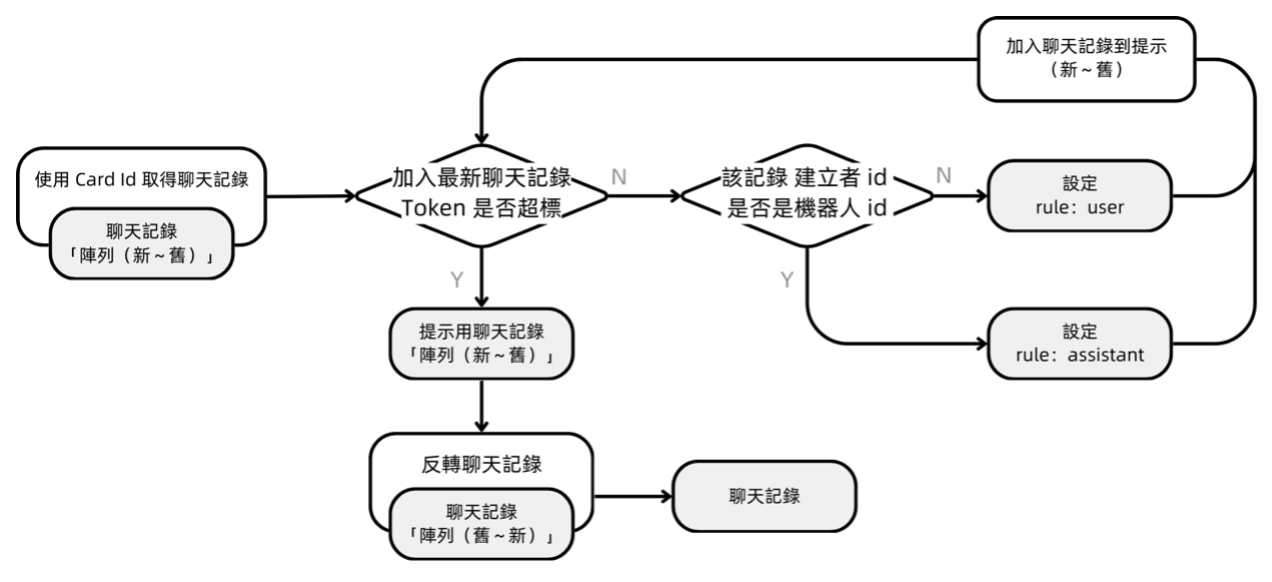
To reply, the system uses the card ID to fetch recent comments. It keeps what fits the token budget and puts the messages in chronological order. It distinguishes student comments from assistant replies and skips system messages such as recommendation lists, helping the model pick up the discussion where it left off.
Give the model reference articles and the conversation
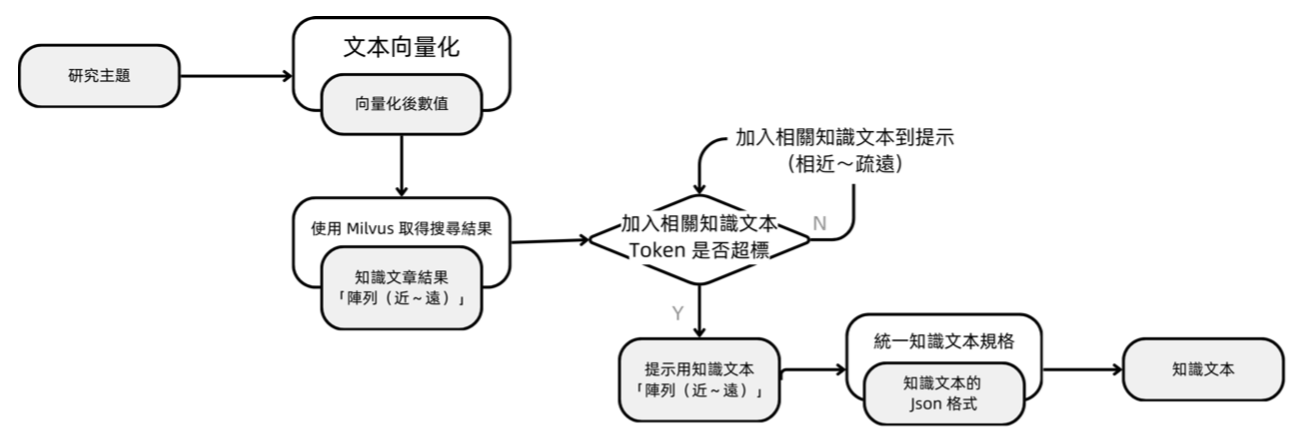
The system retrieves articles based on the card’s topic and latest question, then adds article text and IDs to the prompt within the token budget. The prompt asks the model to answer from those sources and cite their IDs. The system turns recognized IDs into links, so students can check the articles themselves. After posting the answer, it uses a separate prompt to generate a follow-up question.
User Guide and Research Materials
System User Guide
The original guide shows how to create a research card, read the recommendations, and ask a follow-up question in the comments.
Constructing a Self-Regulated Learning Resource Recommendation System Using Natural Language Processing Techniques
In the TWELF 2024 paper I coauthored with Kuo-Liang Ou, we compared what the three methods recommended for two questions high school students actually asked on Trello. The abstract reports that the research involved five high schools in Taiwan. The conclusion records 822 recommendation tasks completed within three months.
Conference Slides
Canva
Conference Paper