Expense tracking usually starts out simple: what did I buy today, how much salary came in, record each transaction and the picture is clear. But as life gets more complex, money starts moving through more places: several credit cards, stock trades, loans between friends, company reimbursement advances, installment payments that are not fully paid off yet. At that point, a plain cashbook starts to break down. The two most common symptoms are:
- The numbers in the app no longer match real assets: after tracking for months, the total expenses and bank balances just do not reconcile.
- You know how much you spent this month, but not where it really went: the category list looks complete, but a six-month review shows that the largest buckets are “transfer,” “other,” or “uncategorized.” The real consumption structure gets diluted until it is no longer useful.
Both problems come from the same root cause: treating every money event as an expense.
Swipe a card: record an expense. Bank debit: record an expense. Buy stocks: record an expense. Lend money to a friend: record an expense. Pay for something on behalf of the company: record an expense. But only about half of these are real expenses. The rest are either money moving between accounts or money temporarily parked somewhere until it comes back. Once all of them are recorded as expenses, total spending stops matching real assets, and your category reports get polluted by unrelated cash flow.
Over the past few years, I have narrowed my system into a multi-account bookkeeping method: every role that money can take on gets its own account: bank account, credit card, cash, loan receivable pool, reimbursement pool, investment account. Bookkeeping becomes a matter of moving money between accounts instead of throwing everything into the “expense” column. In practice, I use Qianji. This post explains how that method works for credit cards, loans, reimbursements, and stocks.
Why Use Multi-Account Bookkeeping?
To answer that, we need to accept one counterintuitive fact first: most things you think of as expenses are actually transfers.
If you break down everyday money events, there are really only three types:
- Real expense: money actually leaves and gets consumed. Coffee, utilities, subscriptions.
- Transfer: money only changes location, and total assets stay the same. Salary deposit, moving money between bank accounts, paying a credit card bill, buying stocks (cash to investment asset), getting loaned money back.
- Virtual flow: money is still in motion, but there is already a receivable or payable relationship. Lending money to a friend, waiting for a company reimbursement, or unpaid installments.
These three often get tangled together. The same 80-dollar coffee purchase is a real expense when the card is swiped, a transfer when the monthly statement closes, and another transfer when the bank debit happens. If all three are recorded as “expenses,” that 80-dollar coffee becomes 240 dollars on paper. Of course the numbers explode.
The core move in multi-account bookkeeping is: turn every money role into its own account. Each bank account gets one account, each credit card gets one account, and sometimes a bank also gets an “aggregate” credit card account. Money lent out goes into a receivable pool, unreimbursed company spending goes into a reimbursement pool, and each investment account gets its own account. Bookkeeping becomes one question: from which account, to which account?
Apply that to the 80-dollar coffee:
- At the moment of purchase: real expense. Food and drink +80, Line Pay card from Bank A liability +80.
- At statement closing: transfer. Line Pay card liability goes back to zero, aggregate Bank A credit card account liability +80.
- At bank debit date: another transfer. Bank deposit -80, aggregate Bank A credit card account goes back to zero.
One 80-dollar purchase passes through three accounts, but only the first step is an expense. The next two are changes in where the money sits. Once the accounts are set up and the events are separated, the numbers in the app start matching real assets, and the spending categories reflect money that was actually consumed.
Why I Use Qianji
When choosing an expense tracking tool, I had four non-negotiable requirements:
- Flexible account classification: multi-account bookkeeping depends on being able to create many accounts. The tool should be loose here: unlimited accounts, grouping, independent initial balances, and credit limits.
- Multi-platform sync: I use multiple devices, so anything recorded on one device should sync to the others.
- Notes on each transaction: every transaction needs notes. Otherwise details like foreign transaction fees, special remarks, and who borrowed what get lost.
- One-time purchase: bookkeeping is a long-term system. A subscription does not feel like the right cost structure for this kind of tool.
Qianji satisfies all four, which is why it has stayed in my setup for years. Its account flexibility works especially well with this method: individual cards, aggregate accounts, reimbursement pools, receivable pools, and investment accounts can all be added freely instead of being squeezed into a few preset fields. Tag search, custom categories, and CSV export are also there, but for me those are bonuses.
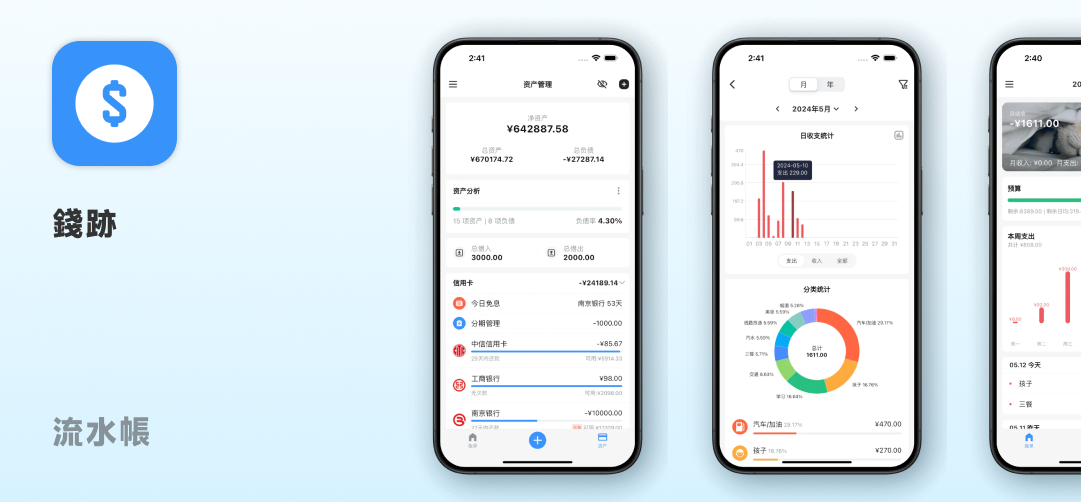
I used Money Manager for quite a while before this. Its input experience and category system are also solid, but it lacked multi-platform sync, so I eventually moved to Qianji. If you only track expenses on one phone, Money Manager is still a good option.
Account Management: Cut the Foundation First
Once you have enough accounts, the principle of “one account, one purpose” is not enough by itself. The accounts need to be grouped by broad type first, then separated with naming rules. I think of it in two layers.
Six Main Categories
All my accounts fall into one of these six categories:
- Cash accounts: physical cash in the wallet. The amount is usually small, but I still track it to avoid the mystery of disappearing cash.
- Bank accounts: salary account, daily spending account, savings account, stock settlement account, amortization withholding account, and other bank accounts.
- Digital assets: mobile wallets like Line Pay Money, Easy Wallet, JKOPay, and stored-value cards.
- Credit cards: individual cards plus aggregate accounts for each bank. I will explain the two-layer structure in the credit card section.
- Stocks and funds: brokerage accounts, separated by broker and market.
- Currency, foreign currency, and other financial assets: foreign currency deposits, insurance policies with surrender value, fixed deposits, and other financial products.
This classification is based on the nature of the financial instrument, not usage frequency. A salary account used every day and an emergency fund touched once a year are both still bank accounts. Classifying by nature first avoids the repeated hesitation of “is this cash or mobile payment?” and “is this a bank account or an investment account?”
Grouping: Keep the Main Screen Usable
The six categories are the mental model. In Qianji’s actual grouping feature, I use a hybrid of frequency + type: high-frequency accounts at the top, rarely used accounts lower down, and special states like disabled accounts or stored-value cards in their own groups.
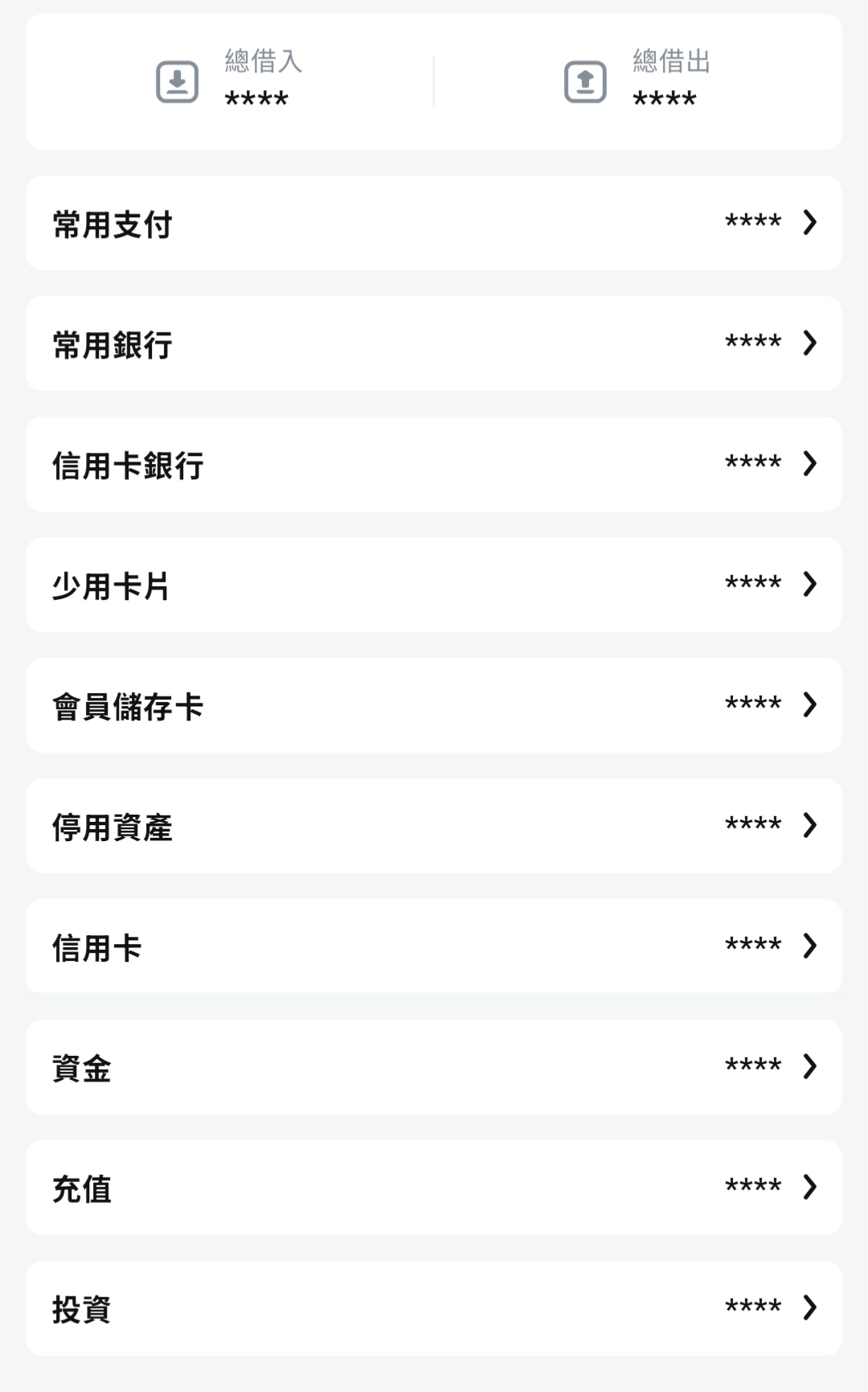
The reason I do not strictly group by the six categories is that the main screen should spend visual space on what I use often. If every bank account is grouped under “Bank Accounts,” I would have to scroll past ten rarely used accounts every time I open the app just to reach the two or three I actually need. Pulling high-frequency accounts into groups like “Common Payments” and “Common Banks” keeps the screen focused on active money.
This hybrid grouping is an operational optimization. It does not change the six-category conceptual framework. Every account still belongs clearly to one of the six categories; grouping only changes where it appears visually.
Naming Rules: Prefix + Last Four Digits
Once there are enough accounts under a category, especially bank accounts and credit cards, categories alone are not enough. I use two naming rules:
Prefixes that mark the account role
| Prefix | Role | Example |
|---|---|---|
Aggregate・ | Aggregate credit card account | Aggregate・Bank Name |
Withhold・ | Pre-withholding / amortization account | Withhold・Insurance, Withhold・Annual Subscriptions |
Stock・ | Stock-related bank account | Stock・Settlement Bank |
Individual credit cards use the last four digits
For example: Line Pay Card・3985 or Airline Card・7020. Even if two cards share a similar co-branded name or design, the last four digits keep them distinguishable.
You do not need to copy my exact prefixes. The point is that the account name should tell you its role in the system at a glance. I use ・ as the separator because it looks less cramped in Qianji.
Using “Excluded” Accounts for Special Liabilities
Qianji has an option called “exclude from total assets.” I use this for handling logical liabilities: money that is still physically with you, but has already been logically committed to a future expense, such as monthly allocation for annual insurance.
Creating this as an asset account and excluding it from total assets lets me do two things:
- The account balance reflects the amount already withheld. A negative balance means accumulated logical payable.
- It does not distort the calculation of “how much real asset do I currently have?”
The amortization withholding account in the irregular expenses section shows the concrete workflow.
Credit Cards: Two-Layer Accounts + Two-Stage Settlement
There are two key ideas behind credit card bookkeeping:
- A credit card is not a payment tool; it is a liability account. When you swipe a card, money does not leave your pocket immediately. A liability accumulates in an account, and only later, when the statement closes and payment is debited, does cash actually move.
- Multiple cards from the same bank share the same credit limit. Most bookkeeping tools do not know that by default, so the account structure needs to simulate the real credit limit pool.
Those two ideas determine my setup: each bank gets one aggregate account plus individual card accounts.
Take a fictional Bank A. Suppose I have two cards from that bank: a Line Pay card and an airline card. In Qianji, I create three credit card accounts:
- Aggregate・Bank A
- Line Pay Card・3985
- Airline Card・7020
The individual cards use the “card name + last four digits” format, as explained earlier.
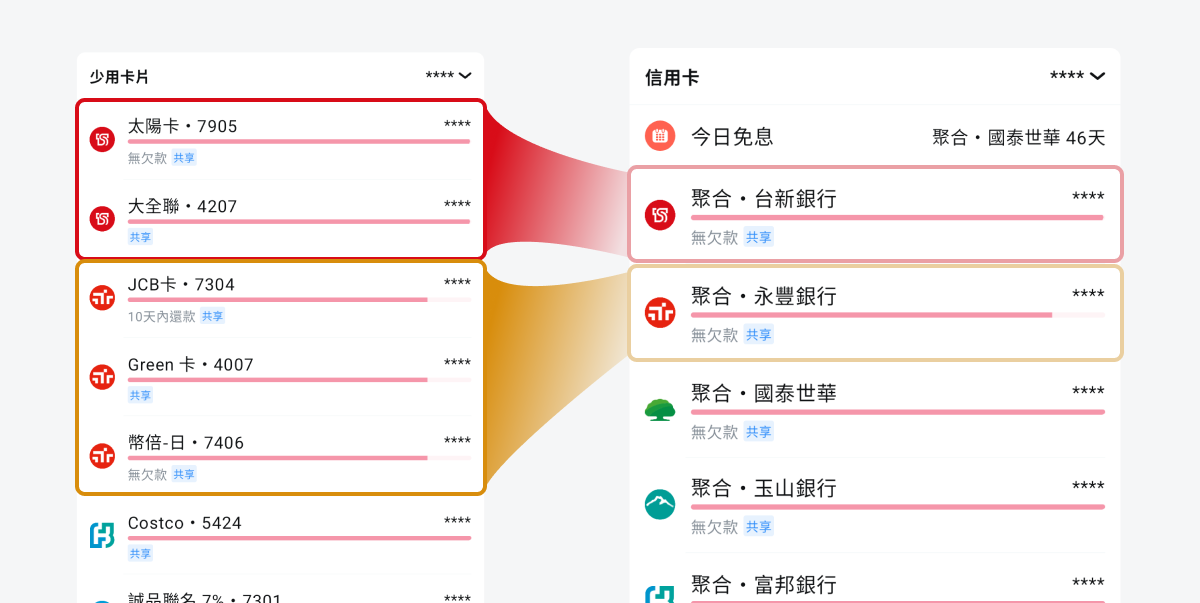
There is a useful detail in the credit limit setup: Qianji supports account binding. Individual cards can bind their total limit to the corresponding aggregate account, so all accounts share the same limit. For example, if Bank A gives you a shared credit limit of 300,000, set that on Aggregate・Bank A, and both Line Pay Card・3985 and Airline Card・7020 inherit it automatically. If the limit changes later, you only update the aggregate account.
The setup path is: open the individual card’s edit page, set the “total limit” field to the corresponding aggregate account, and choose the bank aggregate account from the account list.
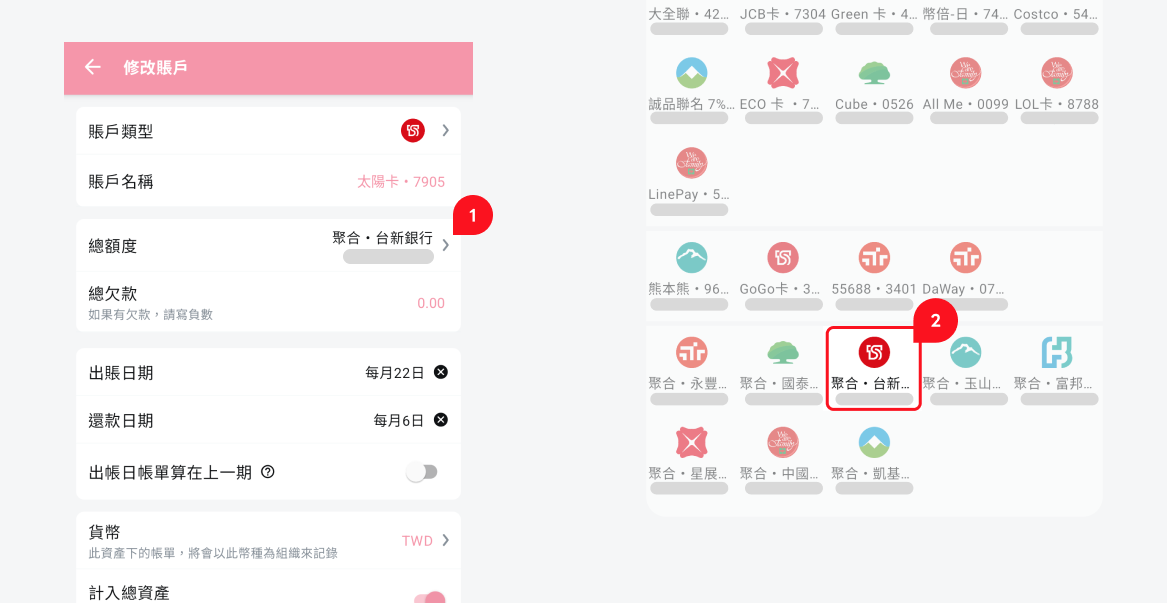
If your bookkeeping tool does not support this kind of binding, you can only manually enter the same limit on each card and remember to update all of them when the bank changes the limit.
The individual cards and aggregate account have different responsibilities:
- Individual cards: record every card transaction, so I can analyze which card was used most this month and which one is worth optimizing for rewards.
- Aggregate account: handles statement closing and payment.
If you manage cards from several banks, the logic is the same. Each bank just has its own closing date and debit date. Copy this “aggregate + individual cards” structure for every bank.
After recording card transactions, the next step is monthly settlement. Statement closing and bank debit are two different transfers at two different moments. They need to be recorded separately. The easiest mistake is treating them as one action.
Statement Date: Aggregate Account Pays Individual Cards
When a bank’s statement closes, I use Qianji’s built-in repayment feature to let the aggregate account pay off each individual card’s current liability. In Qianji’s transaction view, this appears as a transfer from aggregate account to individual card. That is Qianji’s convention for representing repayment: source of funds to card being repaid. The result is:
- Each individual card’s liability goes back to zero.
- The bank’s aggregate account takes over the total statement amount.
Why do this step? Because an individual card liability represents “unbilled spending.” After the statement closes, it becomes a confirmed payable with a fixed debit date. Those two liabilities are different. Separating them by account lets me see, mid-month, how much has already been billed and how much is still accumulating.
Debit Date: Bank Deposit to Aggregate Account
A few days later, on the debit date, the bank automatically pulls money from your bank account, or you pay manually. After this action:
- The bank aggregate account’s liability returns to zero.
- The bank deposit balance decreases by the same amount.
Below is a real statement view from my aggregate SinoPac Bank account. The yellow box marks the statement date, where the aggregate account pays each individual card. The red box marks the debit date, where the bank deposit transfers into the aggregate account:
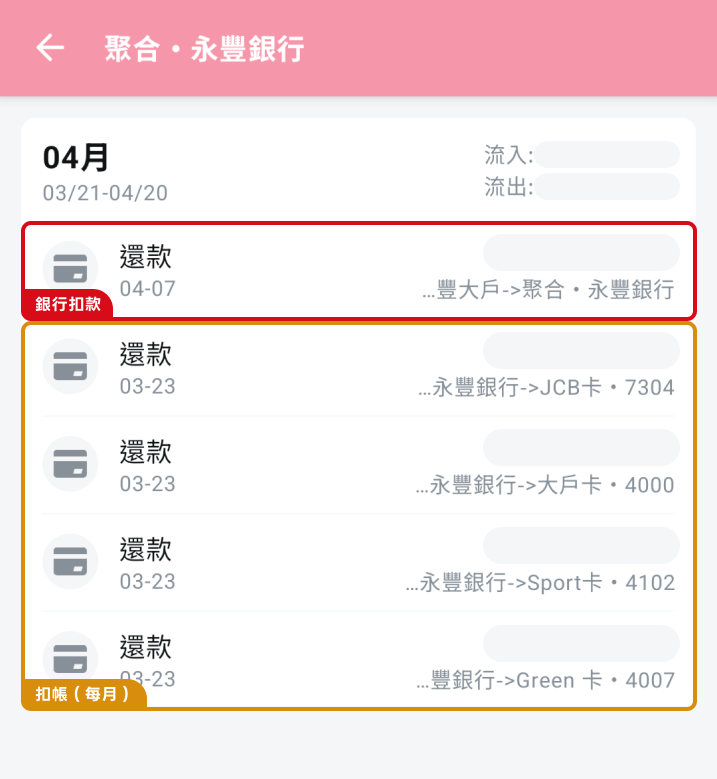
The biggest difference is the time gap. There are usually 7 to 14 days between statement date and debit date. If you only record one transfer on the debit date, directly from bank deposit to individual card, then during that gap the individual cards still look like they owe a pile of money even though the statement has already closed, and the aggregate account shows nothing even though the payable amount is already confirmed. Splitting the two stages maps “billed” and “paid” to reality accurately.
Investments: Settlement Account + Brokerage Account
The most common beginner mistake with stocks is recording stock purchases as expenses. In reality, buying stocks is cash turning into equity assets. It is a transfer, not an expense, and total assets do not change.
Two Required Accounts: Settlement Account and Brokerage Account
For each broker, I create two accounts with different roles:
- Stock settlement account: a bank account, with a
Stock・prefix such asStock・Settlement Bank. The prefix lets me immediately recognize that this bank account is linked to stock activity. It does not necessarily have to be used only for stocks; the same bank account might also handle daily spending or other debits. But with the prefix, I can scan the account list and instantly see which accounts interact with brokers. - Brokerage account: an independent asset account, such as “Broker TW Stocks” or “Broker US Stocks.” All stock purchase costs accumulate here, and selling reduces the corresponding cost.
Stock transactions map like this:
- Buying stocks: Stock・settlement account to brokerage account. This is a transfer, not an expense. The full purchase amount moves from settlement account into brokerage account.
- Selling stocks: the cost portion, calculated from the original purchase cost, moves from brokerage account back to Stock・settlement account. The difference between selling price and cost is recorded as gain or loss: profit as income, loss as expense, both in the settlement account.
- Dividends: record directly as income into the settlement account, without passing through the brokerage account. Dividends are cash returning, not a change in investment cost.
- Transaction fees: record as small expenses in the current period. They are small, but tracking them helps reveal total trading cost over time.
The benefit of separating settlement account and brokerage account is that the brokerage account balance always equals the amount invested at cost. Gains, losses, dividends, and fees belong to the cash side and are handled by the settlement account. The brokerage account stays as a clean principal number.
I Do Not Track Market Value in Qianji
Qianji is a bookkeeping tool, not an investment performance tracker. Market value changes every day, and trying to update it inside Qianji would drive me crazy. My division of labor is:
- Qianji tracks cost only: purchase amount, sell amount, fees, dividends.
- Broker apps handle market value and return rate: each broker’s trading app already calculates these. There is no need to rebuild it.
The advantage is that Qianji’s asset total directly represents “how much principal I have put into investments.” Market watching stays in the brokerage tools, and financial review stays clean.
Loans and Reimbursements: Tracking Money Between People
This section covers two common types of temporary money flow: lending between friends and paying on behalf of a company while waiting for reimbursement. The shared feature is that a sum of money is temporarily parked somewhere, and I need to keep tracking who owes whom how much. For each subsection, I explain Qianji’s built-in method first, then a generic method for readers who use other tools.
Loans
For lending money between friends, Qianji’s built-in borrowing/lending feature is enough. On the asset home screen, tap “Total Lent” to enter the lending management page. There you can see all unsettled loans. Opening one item shows the full lending, repayment, and settlement history:
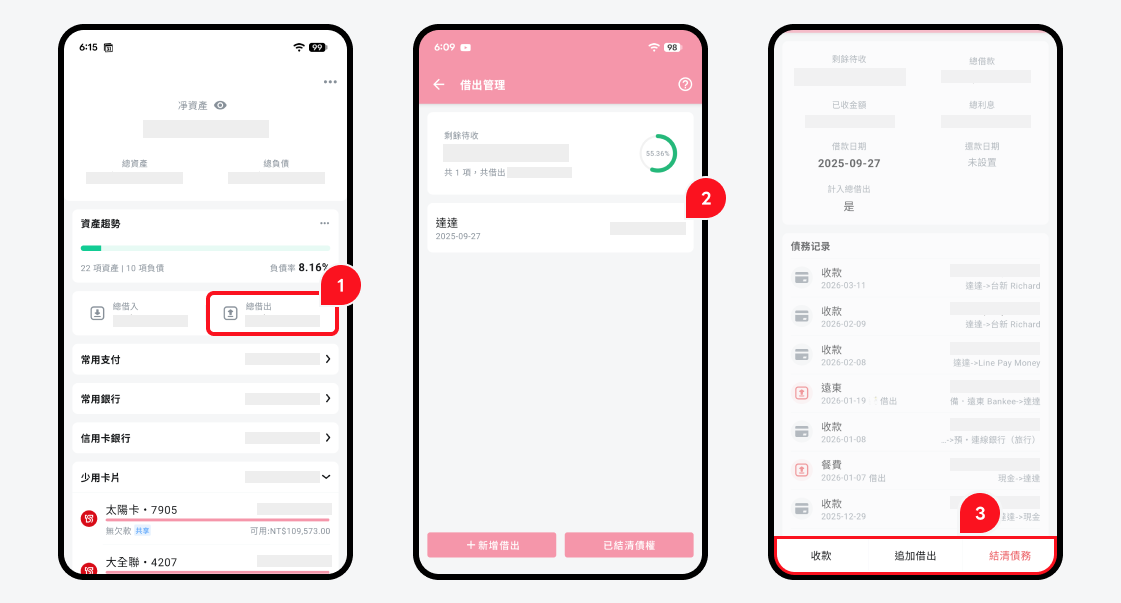
The actions are simple:
- Lend out: bank deposit -X, amount recorded under that person’s loan item.
- Receive repayment: that person’s loan item -X, bank deposit +X.
- Settle: balance goes to zero, loan cleared.
If you are not using Qianji, or want a method that works in any bookkeeping app, create a virtual account named after the person. If the friend is named Ming, create an account called “Ming”:
- Lend Ming 1,000: bank deposit -1,000, “Ming” account +1,000.
- Ming repays 500: “Ming” account -500, bank deposit +500.
- Check the “Ming” account balance: 500, meaning Ming still owes me 500.
Both approaches produce the same effect: “how much this person owes me” becomes an account balance. Qianji just gives it a dedicated UI; other tools can model it with a virtual account.
Company Reimbursements
Company reimbursements work almost the same way as loans. Qianji has a built-in reimbursement marker. When recording a transaction, tap the reimbursement button, and the home screen accumulates “unreimbursed amount.” When the company pays you back, batch-complete the reimbursement.
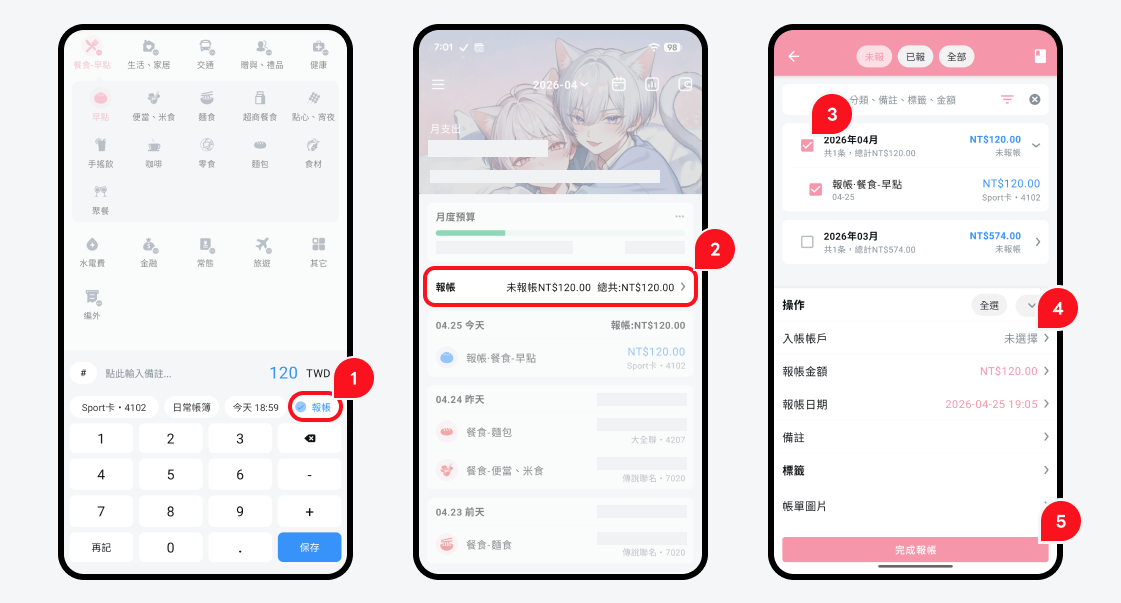
If you are not using Qianji, use the same generic virtual account method, named after the organization. Suppose the company is called Company X:
- Pay 800 on behalf of Company X: bank deposit or credit card -800, “Company X” account +800.
- Company X reimburses 800: “Company X” account -800, bank deposit +800.
The “Company X” account balance represents how much the company still owes me. Once everything is reimbursed, the account goes back to zero. If the company forgets a payment or reimburses the wrong amount, the balance will not clear, and the problem becomes visible automatically. That is the biggest value of this method.
Irregular Expenses: Amortization, Subscriptions, Installments, and Cashback
This section handles another group of flows that beginners often record incorrectly: large annual expenses that should be amortized, credit card installments, subscriptions, and cashback. The shared principle is: let the books reflect when consumption happens, not when cash leaves.
Amortization Withholding Account: Spread Annual Expenses Across Months
Some expenses are essentially “used across multiple months”: annual insurance, yearly cloud subscriptions, annual taxes. If I record a 12,000 insurance payment entirely on the actual debit date, the insurance category explodes in that month, distorting my monthly spending structure. The other 11 months show nothing, even though the expense exists logically across the whole year.
My solution is to create an amortization withholding account:
- Setup: create an asset account in Qianji with the
Withhold・prefix, such asWithhold・Insurance, and exclude it from total assets. - Monthly amortization: every month, record an insurance expense for 1/12 of the annual fee, such as 1,000. Use the withholding account as the payment account. The withholding account balance accumulates a liability over time: -1,000, -2,000, and so on. It directly represents the amount logically reserved for the next actual debit.
- Actual debit date: when the bank really deducts 12,000, record a transfer from bank deposit to the withholding account for 12,000. The withholding account returns to zero.
The result:
- The “insurance” category shows 1,000 every month, evenly distributed instead of exploding in one month.
- I can always see how much I have already allocated for the next insurance payment and how much is still missing.
- Because the account is excluded from total assets, this logical liability does not distort my actual asset calculation.
This mechanism works for anything paid annually but used monthly: insurance, taxes, large annual subscriptions like cloud storage, IDE subscriptions, or domains.
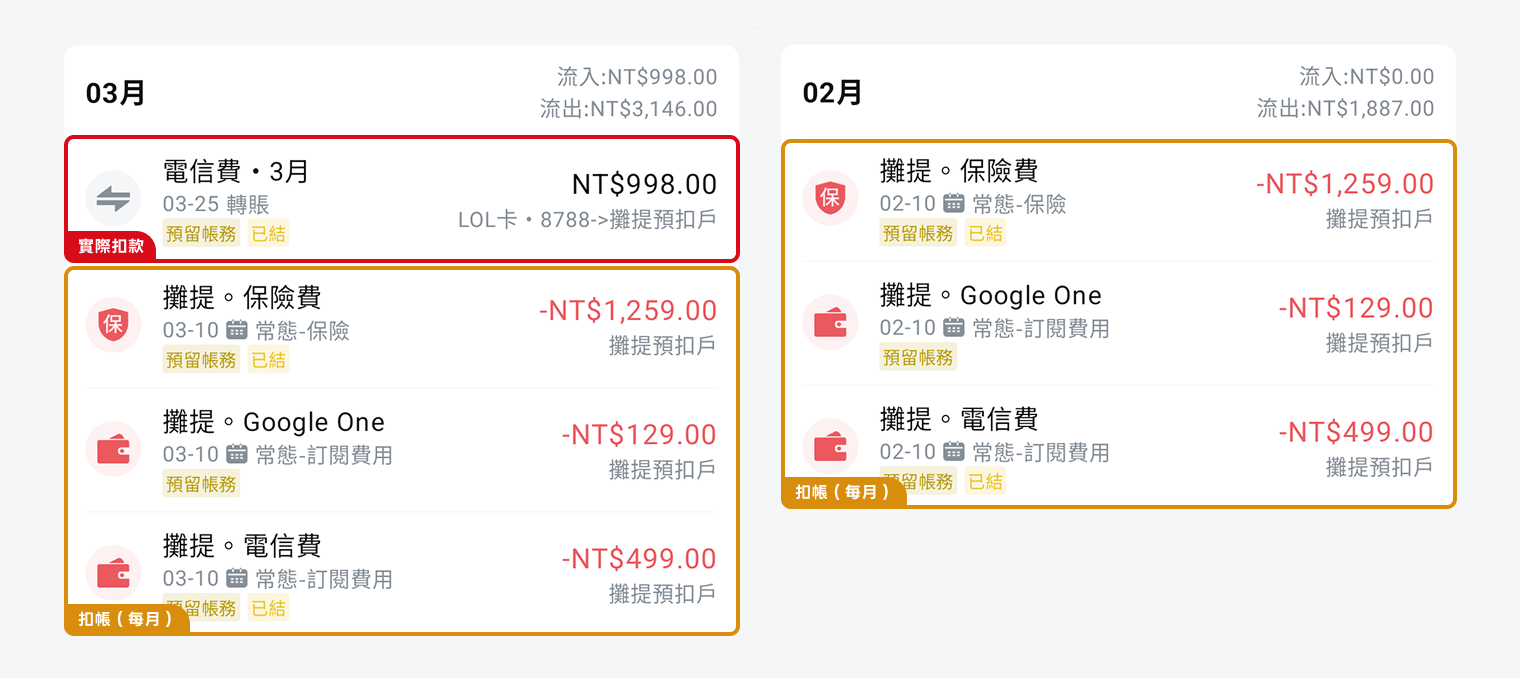
In the screenshot, the yellow boxes are regular monthly amortization entries on the 10th, such as insurance, Google One, and telecom fees. The red box is the actual 998 telecom fee charged to a credit card on 03-25. Once money enters the withholding account, it offsets the accumulated liability.
Subscriptions, Installments, and Cashback
These three situations look related to amortization, but the logic is different. Amortization is for expenses consumed across months. The three cases below are either consumed at the moment of purchase or are only changes in payment method. Consumption happens now, so they should not use amortization.
- Small monthly subscriptions: Spotify, Netflix, SaaS tools. Record them as expenses on the monthly debit date. Monthly billing is already a distributed structure. Adding another amortization layer only adds complexity.
- Installment payments: record the full amount as consumption when the card is swiped, such as 12,000, plus a credit card liability of 12,000. Do not split it into 12 monthly expenses. The later monthly bank debit of 1,000 is a repayment action, from bank deposit to credit card aggregate account, and has nothing to do with when the consumption happened. Bookkeeping should reflect when consumption occurs, not when cash leaves.
- Cashback: cashback received on a statement is recorded as income into the credit card aggregate account. A reduced liability is equivalent to income. If the cashback is applied immediately to the original purchase, record the discounted amount directly when entering that transaction.
Monthly Review
Tracking without review is the same as not tracking. The numbers only matter if they influence next month’s behavior. My review focuses on budget comparison: actual spending versus preset budget. When I see a gap, I adjust next month’s plan. The budget system has two layers: normal budget and off-budget funds.
Normal Budget: Different Thresholds by Category
For each normal spending category, such as food, transportation, subscriptions, and entertainment, I set a monthly budget threshold. At the end of the month, I check which categories exceeded the threshold and which had room left, then adjust next month:
- Exceeded for several months in a row: the threshold is too low, or I need to examine whether the spending is actually necessary.
- Leftover for several months in a row: the budget may be too loose, and I can lower it or move that amount elsewhere.
This part works like the budget feature in most expense tracking apps. There is no special trick. The key is to treat the budget as a signal, not a rule. Going over budget is not failure; it is information.
Off-Budget Funds: Money Set Aside for Multi-Month Use
Some money is set aside once and used across months. For example, allocating 50,000 from a year-end bonus to buy 3C devices, or setting aside red envelope money for family gifts. This money should not be squeezed into the normal monthly category budget, or it will blow up that category immediately.
I handle this with a combination of category attributes + tags in Qianji:
- Create a dedicated tag: for example,
Bonus25for the 2025 year-end bonus budget, orRedEnvelope26for red envelope money. The tag defines the scope of the budget. - Mark related expenses as off-budget: in Qianji, mark the expense with the off-budget attribute so it does not count toward normal category budgets.
- Tag every related expense: whenever I spend from that budget, I add the corresponding tag.
During review, I use Qianji’s bill search feature to filter by tag. The search results show the remaining balance, which is how much of that budget remains:
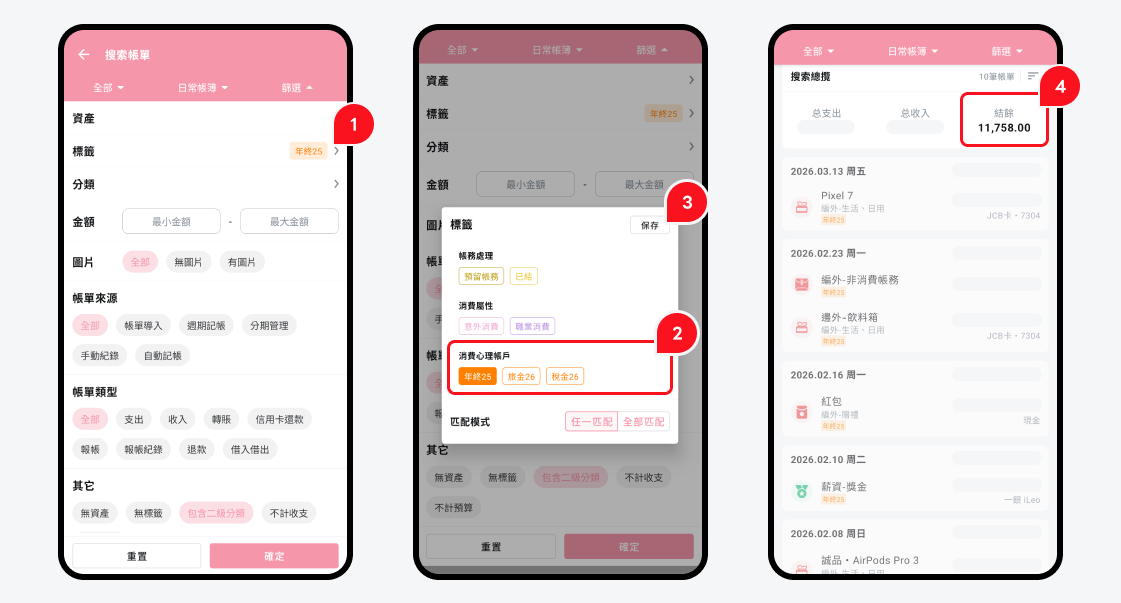
The rule is simple:
Balance > 0: the budget still has money left.Balance <= 0: the budget is used up. Go to Tag Management and hide the tag manually, so it does not get selected by mistake later.
This design keeps normal spending and multi-month dedicated budgets from contaminating each other. Normal categories reflect daily life, while off-budget tags reflect special-purpose funds. Reviews stay clean on both sides.
Extra: Small Qianji Tips
This section is for Qianji users. These two tips are not part of the core multi-account bookkeeping method, but they save a lot of time once set up.
Recurring Transactions: Generate Fixed Expenses Automatically
Qianji has a built-in recurring transaction feature. You can set it to automatically generate specific entries on fixed dates every month, such as utilities, subscriptions, or monthly insurance amortization. Once configured, Qianji creates the transaction on that date. You only need to confirm the amount and save it.
Path: side menu -> Installments & Recurring -> switch to the Recurring tab -> tap ”+ Add recurring transaction,” then fill in start date, repeat cycle, payment account, amount, and other fields.
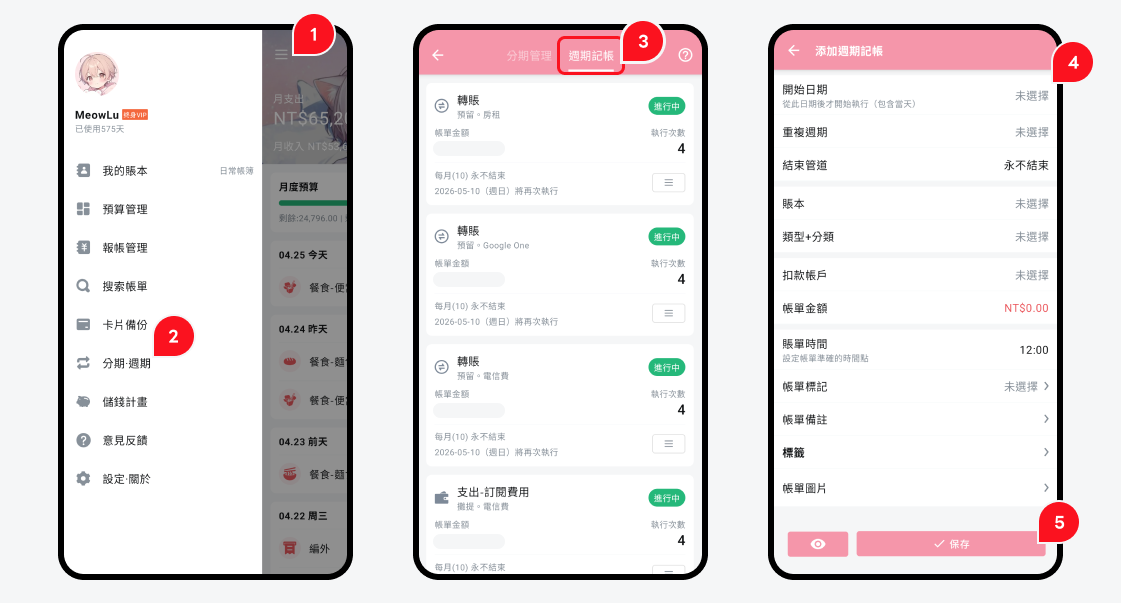
This works especially well with the amortization withholding account from earlier. Insurance allocation, annual subscription allocation, and other fixed monthly entries can all be generated automatically instead of created manually each month.
Apple Shortcuts: Turn Common Entries into One-Tap Actions
Qianji supports Apple Shortcuts on iOS, which makes template bookkeeping possible. Pre-fill the amount, category, and account, then trigger the whole transaction with one tap.
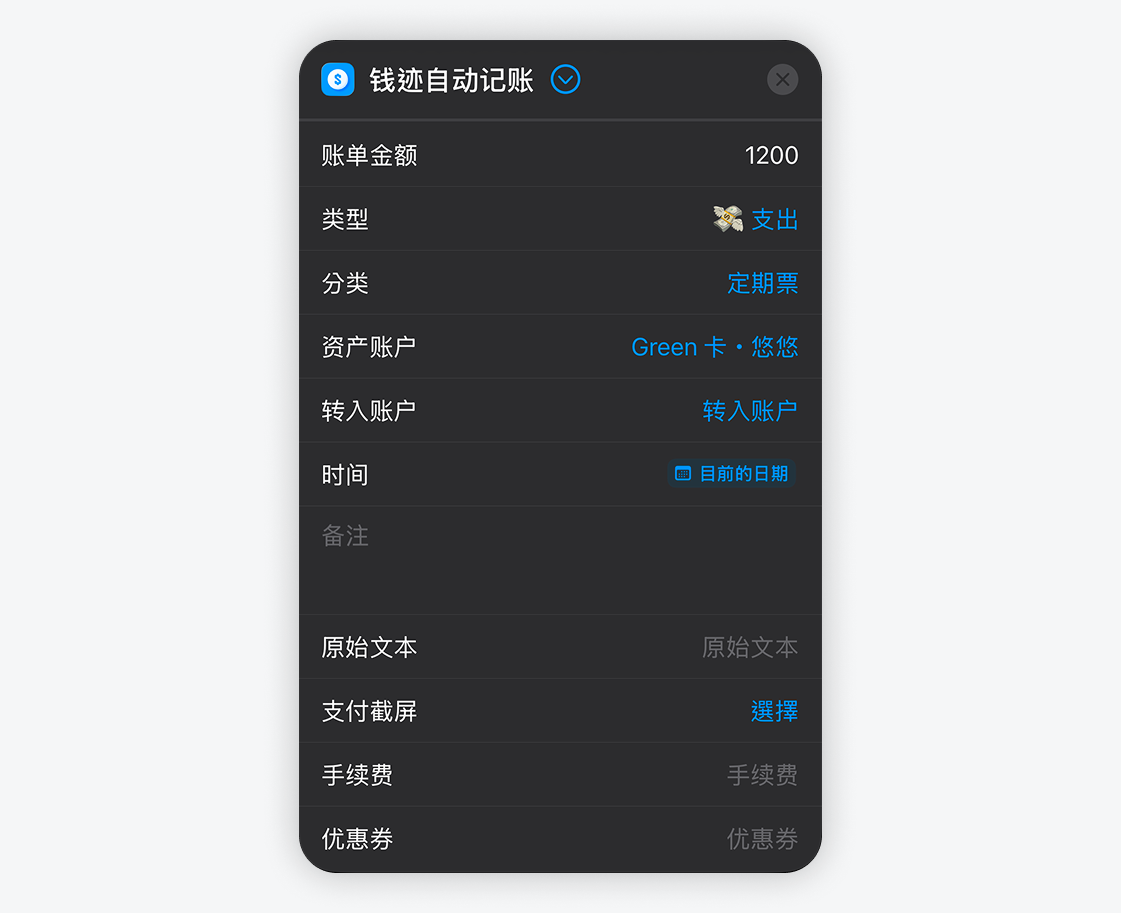
This is useful for situations with high repetition and few variables:
- Commuter pass: fixed amount, category “commuter pass,” specific card account. Tap once after leaving the station and the entry is done.
- Fixed coffee: same coffee every day, fixed amount, one-tap entry.
- Fixed meal: a regular meal at a regular shop, one-tap entry.
The value is that it compresses “open app -> find category -> choose account -> enter amount -> save” into one button. Over time, that saves a meaningful amount of friction and lowers the mental barrier of “I am too lazy to record this.”