Click a Figma link and watch the browser stall on a loading screen before finally bouncing to the desktop app. Click a Notion link and have it open in your personal browser, forcing you to manually switch accounts. These headaches all point to the same thing — macOS’s default browser is a dumb one-to-one mapping: the system only allows one default, but links actually have many identities — work, personal, ones that should go to desktop apps, ones that should land in a specific profile — all jumbled together.
This article is about Velja, a tool built to solve exactly that. It turns the “link → destination” decision from a fixed mapping into something routable, letting every link find the right place automatically based on rules. Below I’ll cover Velja’s positioning first, then unpack three core mechanisms: Browser Picker, Rules, and Apps.
What Velja Is
Velja is a URL router made by Sindre Sorhus — free, macOS only. It inserts a routing layer between the OS and the destination. Normally macOS sends all links straight to the default browser; with Velja installed, Velja becomes the default browser, and it takes over deciding where each link should go.
The mental model is literally a router. Just like network packets get routed by a router to the correct subnet based on rules, Velja treats every link as a routing decision: Which browser should this URL use? Which profile should it land in? Should it skip the browser entirely and jump straight to a desktop app?
Alternatives I tried: Choosy (paid, rule syntax is relatively steep) and Browserosaurus (free and open-source, but only does Browser Picker). The deciding reason I picked Velja — it’s the only one that handles “Apps routing” too. I’ll go into detail below, but in short: Velja doesn’t just help you pick a browser, it can send links straight into desktop apps — something neither of the other two does.
The next three sections cover Velja’s three mechanisms: Browser Picker (pick the destination on the fly), Rules (matched links auto-route), and Apps (skip the browser entirely, straight to a desktop app).
Free Official WebsiteBrowser Picker: Pick the Destination on the Fly
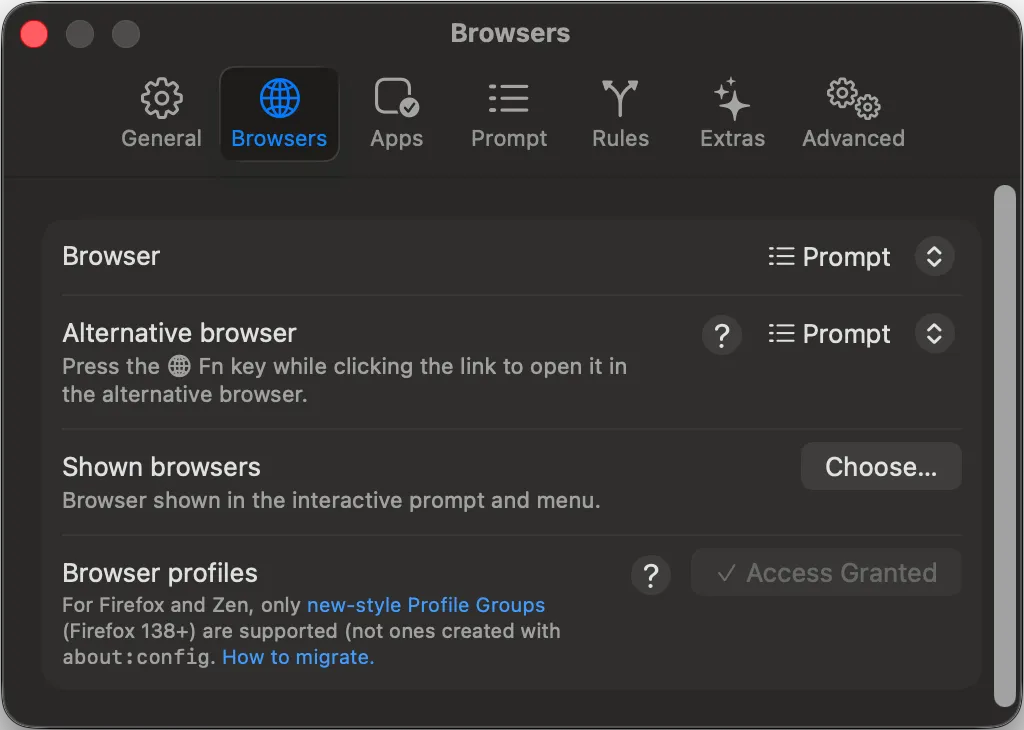
Once you set the default browser to “Prompt”, clicking a link doesn’t open it immediately — instead, a menu pops up asking which browser to use this time.
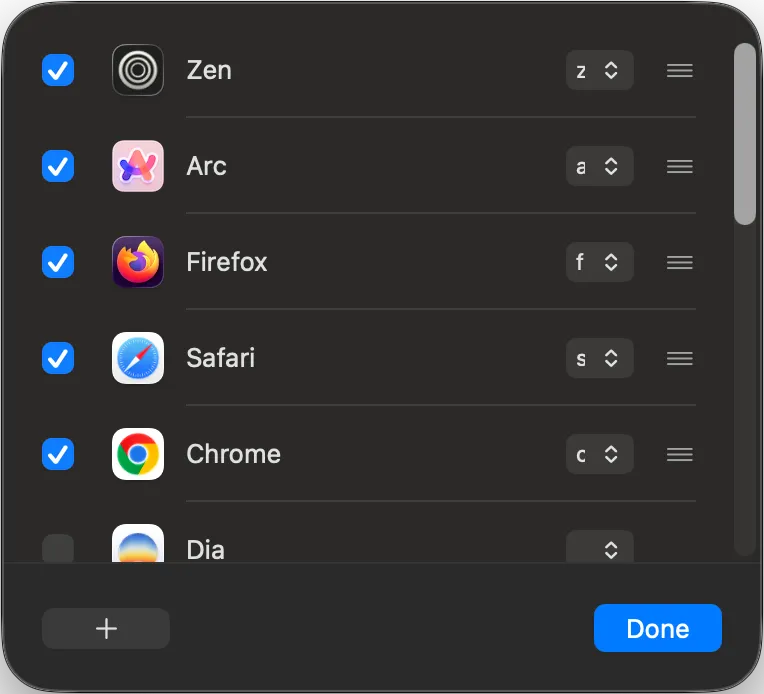
Which browsers appear in the menu can be customized in the Shown browsers panel, and each browser can be bound to a single-key shortcut. My setup is Zen=z, Arc=a, Firefox=f, Safari=s, Chrome=c — menu pops up, press one letter, the link goes straight there. Hands never leave the keyboard.
There’s also a nice detail called Alternative browser — hold Fn while clicking a link, and instead of showing the picker it opens a preset alternate browser directly. Handy when you already know which browser a given link should use — no picking, no rule to remember, one Fn press takes the alternate route.
Rules can cover 80% of daily situations, but the remaining 20% — “I want to decide this one myself every time” — is where the Picker earns its keep as the catch-all safety net. No need to write a rule for every edge case; keeping a manual selection entry point is actually cleaner.
Rules: Route the Majority of Links Automatically
The Picker is convenient, but picking manually for every link gets tiring fast. Rules let matched links skip the Picker entirely and go straight to the right browser.
Basic Syntax: Host and Pattern
Velja supports two kinds of matching: host-based (an entire domain) and pattern-based (URL fragments matching a pattern). My main rules look roughly like this:
*.notion.so→ Zen’s work workspace- Work Gmail (
mail.google.comwith account ID) → Firefox’s work profile - Personal Gmail → Zen’s personal workspace
With good rules in place, most daily links route themselves — no stopping to think.
Profile: Rules Down to the Workspace / Profile Level
Worth calling out: Profile support. Firefox and Zen can have multiple profiles logged in simultaneously (I run separate work and personal ones), and Velja’s rules can go as deep as “this link should not only go to Firefox, but specifically to Firefox’s work profile.”
This is routing at its most granular. Most browser pickers only resolve “which browser” — they can’t target “which profile.” But separating work and personal accounts is crucial in a multi-account workflow — clicking a work Gmail link and landing on the personal profile, then having to manually switch accounts, is maddening when it happens three times a day. Velja turns profile into another routing dimension and that problem just disappears.
Apps: Skip the Browser, Go Straight to the Desktop App
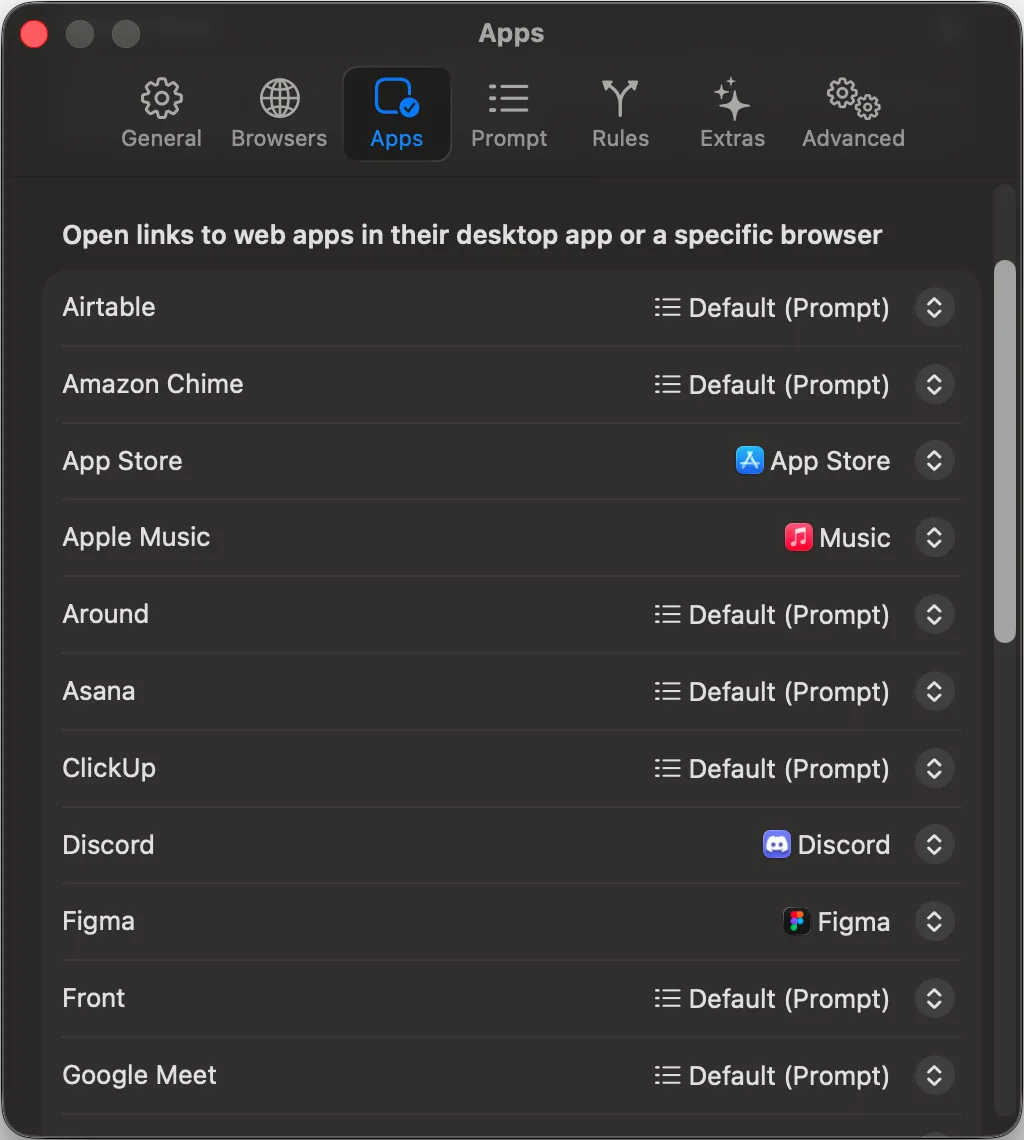
This is the mechanism that makes Velja most distinctive — some links shouldn’t open in a browser at all. The Apps panel maps common web app links directly to desktop apps, bypassing the browser entirely and letting the desktop app handle the link.
My two most-used examples:
Figma: Desktop Can Do More
Design file links (figma.com/file/*, figma.com/design/*) all get routed directly to the Figma desktop app. The desktop version has advanced capabilities the web version can’t do — local fonts, GPU acceleration, offline editing — and opens much faster than the web version.
The old path was “browser loads the page → prompts to open in desktop app → desktop app launches → actually start editing” — four stages. Velja skips the first two entirely, so clicking a link lands me in editing mode almost immediately.
App Store: The Web Is a Shop Window, the Desktop App Is the Entry Point
App Store links (apps.apple.com/*) all get routed straight to App Store.app. The web version is essentially just a “product page” — you can read the description, browse screenshots, check reviews, but you can’t actually download or install an app from the browser. To fulfill what the link is really for, you have to jump into App Store.app.
With Velja routing these directly, the whole “browser opens the page → see ‘Open in Mac App Store’ button → click it → App Store launches” detour just disappears. Clicking the link takes you straight into App Store.app.
Why Some Links Should Skip the Browser
These two examples illustrate two different angles: Figma is “the desktop version does more” (a feature gap), while App Store is “the web version can’t do the thing at all” (the web is just a preview, the desktop app is the real destination). Similar cases: Discord invite links routing to Discord.app, Zoom meeting links routing to Zoom.app — the logic holds. If the desktop app is where these links actually get resolved, let Velja route them through and skip the repeated manual switching.
This is also the biggest gap between Velja and every other browser picker tool — it doesn’t confine itself to “routing between browsers,” it extends the destination to the entire macOS ecosystem. That bigger design scope is the real reason Velja has earned a permanent slot on my machine.